Releasing a Flutter app isn’t necessarily simple. There are a hundred and one things to remember related to signing your app, creating app store assets, distributing the app, and more.
Android
Note: You can read more about releasing an Android Flutter app here.
Note: This guide assumes you created your Flutter project using the Sapid Labs Flutter template. 💙 means this is completed for you.
Build & Release
Sign App
First, create your upload keystore using the following command:
keytool -genkey -v -keystore ./keys/upload-keystore.jks -keyalg RSA -keysize 2048 -validity 10000 -alias uploadI usually store the signing key in the same project where it is used and add the keys directory to my .gitignore 💙.
Caution: You can technically use one upload keystore for all of your applications. If you do this however, it makes it difficult to easily transfer the app to someone else.
Next, follow the steps listed here to configure app/build.gradle 💙.
Create a new file at [project]/android/key.properties and fill it in. For example:
storePassword=password
keyPassword=password
keyAlias=alias
storeFile=../keys/my-keystore.jks
Build
For the first release, use the flutter CLI. The flutter build command defaults to using the release build configuration. To create a release build, run the following command:
flutter build appbundleFor subsequent releases, run the Fastlanes:
cd android
fastlane internal
Test With Firebase App Distribution
If you’d like to send the app to testers before it is available on the app stores, you can do so using Firebase App Distribution.
APKs
You can distribute APKs without creating an app in the Google Play console. To start, build the .apk:
flutter build apkThen, drag the APK from build/app/outputs/flutter-apk/app-release.apk into the app distribution page in the Firebase console.
App Bundles
You can also distribute app bundles to users, but the setup is more involved. Namely, you need to link your Firebase project to your Google Developer Console.
First, build the app bundle:
flutter build appbundleThen, upload the build/app/outputs/bundle/release/app-release.aab file to the internal testing track in the Google Play console (this is required to distribute app bundles via Firebase).
Fastlane
Note: You can use a single Fastlane Key for all Google Play apps. To add a new app:
- Open the Google Play Console
- Navigate to Users and Permissions
- Select your Fastlane service account
- Select “Add app”
- Select your app and Save Changes
Create a new service account for Fastlane if you don’t have one already.
In the android/fastlane/Appfile file, update the json_key_file and package_name entries to match your project’s values.
Caution: If you don’t want to send Slack notifications for new releases, delete or comment out the
send_slack_notificationfunctions in the android Fastfile
Assets
| Spec | Value |
|---|---|
| Icon Size | 512 x 512 px |
| Feature Graphic Size | 1024 x 500 px |
| Phone Screenshot Size | 9:16 Aspect Ratio |
| 7-inch Tablet Screenshot Size | 9:16 Aspect Ratio |
| 10-inch Tablet Screenshot Size | 9:16 Aspect Ratio |
Screenshots
Screenshots must be PNG or JPEG, up to 8 MB each, 16:9 or 9:16 aspect ratio, with each side between 320 px and 3,840 px
You can use the Device art generator provided by Google to create nice looking mockups.
Launch Icons
Your app icon must be a PNG or JPEG, up to 1 MB, 512 px by 512 px, and meet our design specifications and metadata policy
I typically use icon.kitchen to create my app icons. Once I’ve downloaded the assets, I then follow the instructions in this Stack Overflow answer to add the icons to my app using Android Studio.
iOS
Note: You can read more about releasing an iOS Flutter app here.
Build & Release
Build
For the first release:
flutter build ipaFor subsequent releases, run the Fastlanes:
cd ios
fastlane beta
Fastlane
In the ios/fastlane/Appfile file, update the app_identifier, apple_id, itc_team_id, and team_id entries to match your project’s values.
Caution: If you don’t want to send Slack notifications for new releases, delete or comment out the
send_slack_notificationfunctions in the android Fastfile
Next, create an app-specific password and add it to the .env.default file in the ios/fastlane directory (source):
FASTLANE_USER=<Apple USER ID>
FASTLANE_APPLE_APPLICATION_SPECIFIC_PASSWORD=<App-Specific Password>
Assets
| Spec | Value |
|---|---|
| Icon Size | 1024 x 1024 px |
| Feature Graphic Size | 1024 x 500 px |
| 5.5-inch Phone Screenshot Size | 1242 x 2208 px |
| 6.5-inch Phone Screenshot Size | 1284 x 2778 px |
| 12.9-inch iPad Screenshot Size | 2048 x 2732 px |
Screenshots
Devices for screenshots:
- 6.5 inch - iPhone 14 Pro Max/iPhone 14 Plus
- 5.5 inch - iPhone 8 Plus
- iPad Pro (3rd gen) - iPad Pro (12.9 inch)
- iPad Pro(2nd gen) - iPad Pro (12.9 inch)
Launch Icons
App store icons should be 1024x1024 px and according to the Apple docs:
You can let the system automatically scale down your 1024x1024 px app icon to produce all other sizes
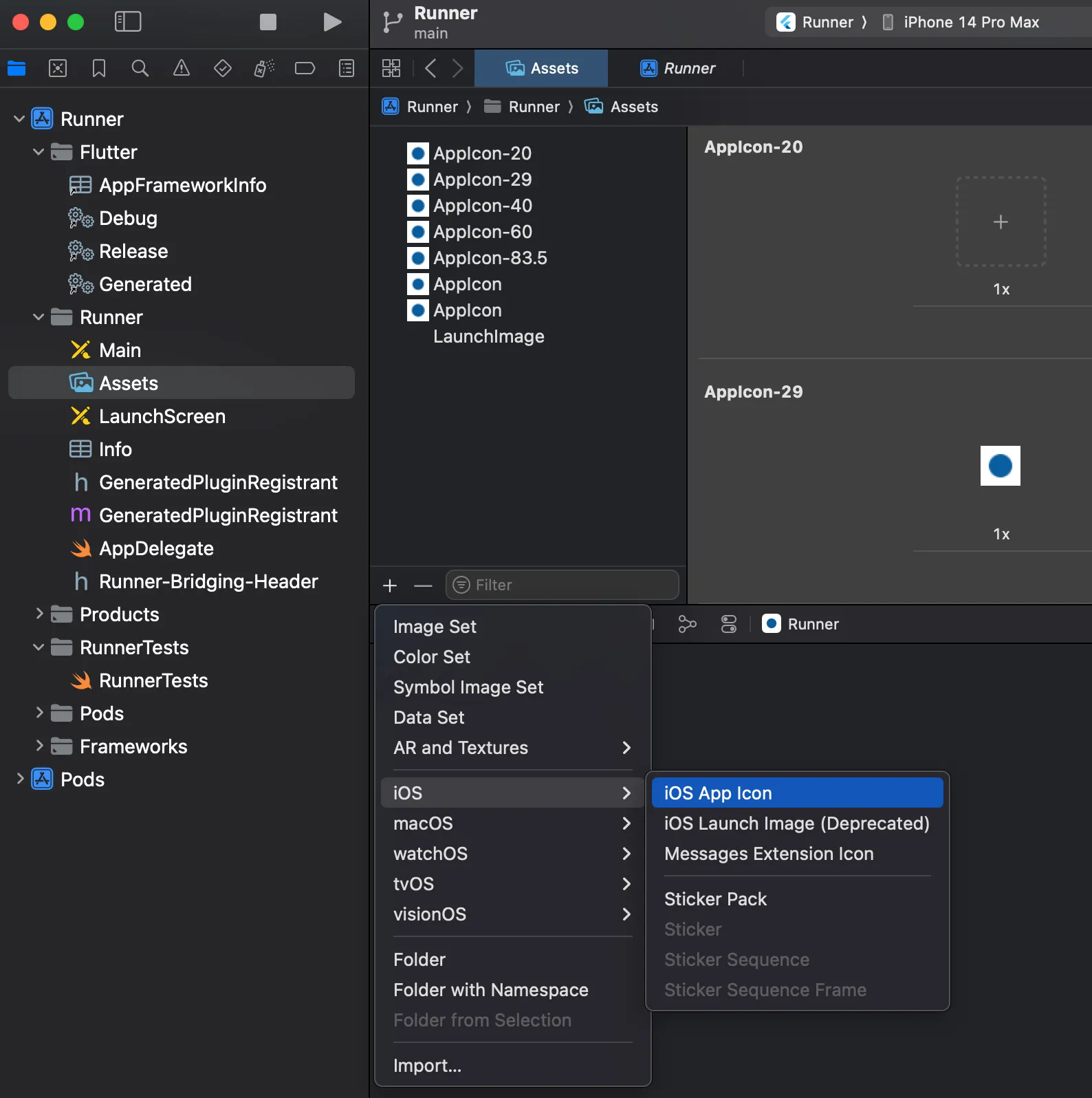
To do this, navigate to the Assets section under Runner/Runner in XCode and press the ”+” icon. Select IOS and then IOS App Icon. This will add an “AppIcon” asset to the project. You can drag a file from your finder onto one of the slots to update the launcher icon.
Landing page
Assets
Mockups
I use this Figma file for creating 2D mockups.
- Double-click the center of a device and then select the
Imagebutton in the “Fill” section on the sidebar. - Choose your image.
- Select the device frame.
- Scroll all the way down in the sidebar to the “Export” section and export your image.
Badges